

OData is a powerful protocol for accessing and manipulating data across different platforms. In this guide, you’ll learn how to consume OData in Mendix, connect external data sources, retrieve data using filters and queries, and display it in your Mendix app. Whether you’re integrating with third-party APIs or internal services, this step-by-step tutorial will help you efficiently work with OData in Mendix.
I am consuming this OData in other application.
First create the Mendix application in any version. Here, I am using 9.24.26
-> Open Mendix studio pro
-> Create new app
-> Select Blank web app
IMPORTANT :- Where you will find your metadata & Service URL?
Just open your previously created application where you published your OData services & Open POS_Customer -> Go to Settings tab & Copy your both links to use here.
Remember, we need to start the localhost server of our first application because we are testing this on localhost.

Go to MX Studio Pro -> right click on ConsumeOData(MyFirstModule) -> click on other->Consumed OData Service & give the name COS_Customer.

After clicking on Consumed OData Service you will get this pop up. Paste your metadata link here & Click ok.

After clicking Ok you will get new pop where you have to add Service URL, But first we have to make Constant to use Service URL.

Just click on Select & Make a new Constant CONS_ServiceURL.

After clicking Ok just paste your Service URL.

Click on View → Data Hub. You will notice that a new tab called Data Hub has been added on the right-hand side.

Go to Domain Model → Data Hub. You will see that you can access the Customer entity here. You can perform the operations you defined when publishing the OData service. Drag & Drop the Customer entity here.

I defined read & update. So i will perform them here & show you.
Read Operation :- Go to Home_Web page -> Take a DataGrid -> In the DataSource select Database & Select Customers entity. Add your all attributes which you want to show.

Update Operation:- I have a CustomerName set as “Mendix 1”, and I want to update it to “Saqib”.
Just take a button on DataGrid called Update -> Set onClick as microflow->Open your newly created microflow.
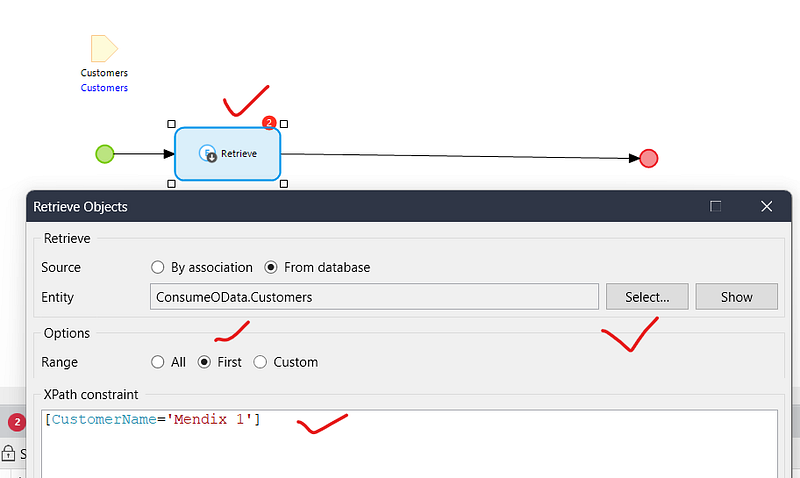

To commit an external object (retrieved from OData), we have to use “Send External Object.” Suppose we also had defined delete operation then we would need to use “Delete External Object” for delete an external object.


This value will also be updated in the main entity from where you published the OData service.
Similarly do for Association Entity :-


Conclusion:
I hope this article has helped you understand How to Consumed OData in Mendix.
Thanks for reading this! See you in the next blog post.